Showing posts with label Java. Show all posts

Thursday, July 30, 2020

In java -D what does the D stand for?

I've always assumed it was to define the value of a property... possibly a legacy from C compilers, which often use -D as similar to #define in code.

EDIT: The closest I have to a source for this at the moment is some JDK 1.1 documentation which specifies the flag as:

Redefines a property value. propertyName is the name of the property whose value you want to change and newValue is the value to change it to. [...]

That at least contains the word "redefine" which is close to "define" :)

Monday, March 9, 2020

What is the serialVersionUID?


1. Overview
Simply put, the serialVersionUID is a unique identifier for Serializable classes.
This is used during the deserialization of an object, to ensure that a loaded class is compatible with the serialized object. If no matching class is found, an InvalidClassException is thrown.
2. Example
Let's start by creating a serializable class, and declare a serialVersionUID identifier:
1
2
3
4
5
6
7
public class AppleProduct implements Serializable {

    private static final long serialVersionUID = 1234567L;

    public String headphonePort;
    public String thunderboltPort;
}
Next, we'll need two utility classes: one to serialize an AppleProduct object into a String, and another to deserialize the object from that String:
1
2
3
4
5
6
7
8
9
10
11
12
13
14
15
16
17
18
19
20
21
22
public class SerializationUtility {

    public static void main(String[] args) {
        AppleProduct macBook = new AppleProduct();
        macBook.headphonePort = "headphonePort2020";
        macBook.thunderboltPort = "thunderboltPort2020";

        String serializedObj = serializeObjectToString(macBook);
  
        System.out.println("Serialized AppleProduct object to string:");
        System.out.println(serializedObj);
    }

    public static String serializeObjectToString(Serializable o) {
        ByteArrayOutputStream baos = new ByteArrayOutputStream();
        ObjectOutputStream oos = new ObjectOutputStream(baos);
        oos.writeObject(o);
        oos.close();
         
        return Base64.getEncoder().encodeToString(baos.toByteArray());
    }
}
1
2
3
4
5
6
7
8
9
10
11
12
13
14
15
16
17
18
19
20
21
22
23
24
25
26
27
28
29
30
public class DeserializationUtility {
  
    public static void main(String[] args) {
  
        String serializedObj = ... // ommited for clarity
        System.out.println(
          "Deserializing AppleProduct...");
  
        AppleProduct deserializedObj = (AppleProduct) deSerializeObjectFromString(
          serializedObj);
  
        System.out.println(
          "Headphone port of AppleProduct:"
            + deserializedObj.getHeadphonePort());
        System.out.println(
          "Thunderbolt port of AppleProduct:"
           + deserializedObj.getThunderboltPort());
    }
  
    public static Object deSerializeObjectFromString(String s)
      throws IOException, ClassNotFoundException {
   
        byte[] data = Base64.getDecoder().decode(s);
        ObjectInputStream ois = new ObjectInputStream(
          new ByteArrayInputStream(data));
        Object o = ois.readObject();
        ois.close();
        return o;
    }
}
We begin by running SerializationUtility.java, which saves (serializes) the AppleProduct object into a String instance, encoding the bytes using Base64.
Then, using that String as an argument for the deserialization method, we run DeserializationUtility.java, which reassembles (deserializes) the AppleProduct object from the given String.
The output generated should be similar to this:
1
2
3
4
5
Serialized AppleProduct object to string:
rO0ABXNyACljb20uYmFlbGR1bmcuZGVzZXJpYWxpemF0aW9uLkFwcGxlUHJvZHVjdAAAAAAAEta
HAgADTAANaGVhZHBob25lUG9ydHQAEkxqYXZhL2xhbmcvU3RyaW5nO0wADmxpZ2h0ZW5pbmdQb3
J0cQB+AAFMAA90aHVuZGVyYm9sdFBvcnRxAH4AAXhwdAARaGVhZHBob25lUG9ydDIwMjBwdAATd
Gh1bmRlcmJvbHRQb3J0MjAyMA==
1
2
3
Deserializing AppleProduct...
Headphone port of AppleProduct:headphonePort2020
Thunderbolt port of AppleProduct:thunderboltPort2020
Now, let's modify the serialVersionUID constant in AppleProduct.java, and reattempt to deserialize the AppleProduct object from the same String produced earlier. Re-running DeserializationUtility.java should generate this output.
1
2
3
4
5
6
7
8
9
10
Deserializing AppleProduct...
Exception in thread "main" java.io.InvalidClassException: com.baeldung.deserialization.AppleProduct; local class incompatible: stream classdesc serialVersionUID = 1234567, local class serialVersionUID = 7654321
    at java.io.ObjectStreamClass.initNonProxy(ObjectStreamClass.java:616)
    at java.io.ObjectInputStream.readNonProxyDesc(ObjectInputStream.java:1630)
    at java.io.ObjectInputStream.readClassDesc(ObjectInputStream.java:1521)
    at java.io.ObjectInputStream.readOrdinaryObject(ObjectInputStream.java:1781)
    at java.io.ObjectInputStream.readObject0(ObjectInputStream.java:1353)
    at java.io.ObjectInputStream.readObject(ObjectInputStream.java:373)
    at com.baeldung.deserialization.DeserializationUtility.deSerializeObjectFromString(DeserializationUtility.java:24)
    at com.baeldung.deserialization.DeserializationUtility.main(DeserializationUtility.java:15)
By changing the serialVersionUID of the class, we modified its version/state. As a result, no compatible classes were found during deserialization, and an InvalidClassException was thrown.
3. Example – Add New Field to an Existing Class
Let's say we need to add a new field lightningPort to our existing AppleProduct class:
1
2
3
4
public class AppleProduct implements Serializable {
//...
    public String lightningPort;
}
Since we are just adding a new field, no change in the serialVersionUID will be required. This is because, during the deserialization process, null will be assigned as the default value for the lightningPort field.
Let's modify our DeserializationUtility class to print the value of this new field:
1
2
System.out.println("LightningPort port of AppleProduct:"
  + deserializedObj.getLightningPort());
Now, when we rerun the DeserializationUtility class, we will see output similar to:
1
2
3
4
Deserializing AppleProduct...
Headphone port of AppleProduct:headphonePort2020
Thunderbolt port of AppleProduct:thunderboltPort2020
Lightning port of AppleProduct:null


Per Josh, the automatically-generated UID is generated based on a class name, implemented interfaces, and all public and protected members. Changing any of these in any way will change the serialVersionUID. So you don't need to mess with them only if you are certain that no more than one version of the class will ever be serialized (either across processes or retrieved from storage at a later time).
If you ignore them for now, and find later that you need to change the class in some way but maintain compatibility w/ old version of the class, you can use the JDK tool serialver to generate the serialVersionUID on the old class, and explicitly set that on the new class. (Depending on your changes you may need to also implement custom serialization by adding writeObject and readObject methods - see Serializable javadoc or aforementioned chapter 11.)


Friday, November 15, 2019

File Changes WatchService - When a file is updated in java


import static java.nio.file.StandardWatchEventKinds.ENTRY_CREATE;
import static java.nio.file.StandardWatchEventKinds.ENTRY_DELETE;
import static java.nio.file.StandardWatchEventKinds.ENTRY_MODIFY;

import java.io.BufferedReader;
import java.io.FileReader;
import java.io.IOException;
import java.nio.file.FileSystems;
import java.nio.file.Path;
import java.nio.file.Paths;
import java.nio.file.WatchEvent;
import java.nio.file.WatchKey;
import java.nio.file.WatchService;
import java.util.stream.Collectors;

public class DirectoryWatchDemo {
public static void main(String[] args) {
try {
WatchService watcher = FileSystems.getDefault().newWatchService();
Path dir = Paths.get("D:\\WatchService");
dir.register(watcher, ENTRY_CREATE, ENTRY_DELETE, ENTRY_MODIFY);
System.out.println("Watch Service registered for dir: " + dir.getFileName());
long initialCount = 0;
while (true) {
WatchKey key;
try {
key = watcher.take();
} catch (InterruptedException ex) {
return;
}

for (WatchEvent<?> event : key.pollEvents()) {
WatchEvent.Kind<?> kind = event.kind();

@SuppressWarnings("unchecked")
WatchEvent<Path> ev = (WatchEvent<Path>) event;
Path fileName = ev.context();

String filePath = dir.toString() + "\\" + fileName;

BufferedReader br1 = new BufferedReader(new FileReader(filePath));
long thisCount = br1.lines().count();
if (thisCount != 0) {

BufferedReader br2 = new BufferedReader(new FileReader(filePath));
System.out.println(br2.lines().skip(initialCount).collect(Collectors.toList()));
br2.close();
initialCount = thisCount;
}
br1.close();
/*
* if (kind == ENTRY_MODIFY &&
* fileName.toString().equals("DirectoryWatchDemo.java")) {
* System.out.println("My source file has changed!!!"); }
*/
}

boolean valid = key.reset();
if (!valid) {
break;
}
}

} catch (IOException ex) {
System.err.println(ex);
}
}
}

Output:
File in the Directory: D:\\WatchService\\ExampleText.txt

Watch Service registered for dir: WatchService
[Good Morning, How are you ?, Where are you going ?, When will you come?, GGood, Check, Good , Check, Show, Love You, Told you, Tuuu]
[]
[]
[Good]

Tuesday, October 30, 2018

Start or Stop ActiveMQ in Java

Method:
private static void stopActiveMQ(String java, String mqPath) throws IOException {
File cwd = new File(mqPath);

ProcessBuilder pb = new ProcessBuilder(java, "-jar", "activemq.jar", "stop").inheritIO();
pb.directory(cwd);

Process proc = pb.start();
try {
proc.waitFor();
} catch (InterruptedException e) {
e.printStackTrace();
}
}

Calling the above Method:

stopActiveMQ("C:\Program Files\Java\jdk1.8.0_92\bin\java.exe", "E:\Softwares\apache-activemq-5.13.1\bin");

Friday, October 5, 2018

How to Get and Run VisualVM for Profiling

How to Get and Run VisualVM

The good news here, you actually don’t need to do anything, it is already available in the JDK bin directory. It’s available after JDK 1.6 update 7. Once you are in the bin directory of JDK, you will find jVisualVM.exe; just click on it, and the application starts up.

Step 1: Go the Java Bin directory and click on the jvisualvm.exe
Step 2: On clicking the above .exe we will get the following screen.


Step 3: When we run the Tomcat, then automatically the pid will be detected by VisualVM and will be showing in the following manner.


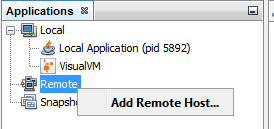
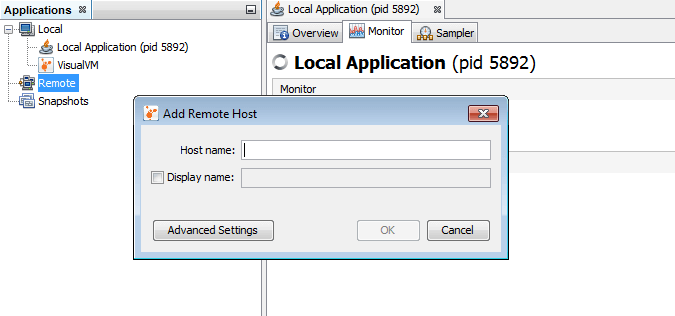
The on top-left you can see application tab, and under this, you can see different options like Local, Remote and Snapshots. To set a remote application profiling, you must connect to the remote server and add that application:
VisualVM Options

Local Applications
While setting up the remote application, you can give it name as well, “Display name:.”


Benefits

There are many important features that VisualVM supports, such as:
  1. Visual interface for local and remote java applications running on JVM.
  2. Monitoring of application’s memory usage and application’s runtime behavior.
  3. Monitoring of application threads.
  4. Analyzing the memory allocations to different applications.
  5. Thread dumps – very handy in case of deadlocks and race conditions.
  6. Heap dumps – very handy in analyzing the heap memory allocation.
So if you see the above list, you can actually monitor your applications — both local and remote — which is quite handy in case of a run time exception, like outOfMemoryException, deadlocks, race conditions, etc., as you get to visually see which objects are causing an outOfMemoryException, for example, or the objects/resources causing thread deadlock.


Recent Post

Databricks Delta table merge Example

here's some sample code that demonstrates a merge operation on a Delta table using PySpark:   from pyspark.sql import SparkSession # cre...